
Early access · Release date: March 24, 2025
UpdatedSchedule I Guide: From First Sales to Full Automation
Build your business with this Schedule I guide covering early cash, customers, pricing, employee routes, and bungalow automation. Make each upgrade count.
Jump to
How to Start and Progress in Schedule I
For a new save, this Schedule I guide recommends completing Uncle Nelson’s opening tasks, establishing motel production, and using samples to unlock customers. Reinvest earnings in supplies and space before hiring employees, then connect supply shelves, workstations, and storage so your bungalow can run an automated production line.
Progression priorities through v0.4.7
| Stage | Next action | Progress checkpoint |
|---|---|---|
| Opening | Complete Uncle Nelson’s opening tasks | Establish your motel operation |
| Early production | Keep seeds, soil, and packaging stocked | Fulfill orders while reserving samples |
| Early expansion | Buy the room above the Chinese restaurant | The purchase costs $800 |
| Distribution | Unlock and recruit Benji Coleman | Assign customers and provide packaged inventory |
| Bungalow automation | Connect growing, processing, and packaging | Production workers have supplies, assignments, and wages |
| Bulk sales | Supply visiting special customer groups | v0.4.7 adds four traveling groups |
Before advancing the opening sequence, harvest the plants in the RV and collect its usable equipment. Empty stations and shelves before picking them up.
Recovering those items reduces how much equipment you need to replace after losing the RV. Keep your watering can and trimmers accessible while moving into the motel.
Then follow the tutorial through planting, harvesting, packaging, and completing deals. Buy the room above the Chinese restaurant when the objectives direct you there and you have the $800 purchase price ready.
Official page: Schedule I (scheduleonegame.com)
Make Early Money Without Running Out of Supplies
Your opening sales need to fund the next production cycle. Spending everything on another grow setup leaves you stuck if you cannot afford its seeds, soil, or packaging.
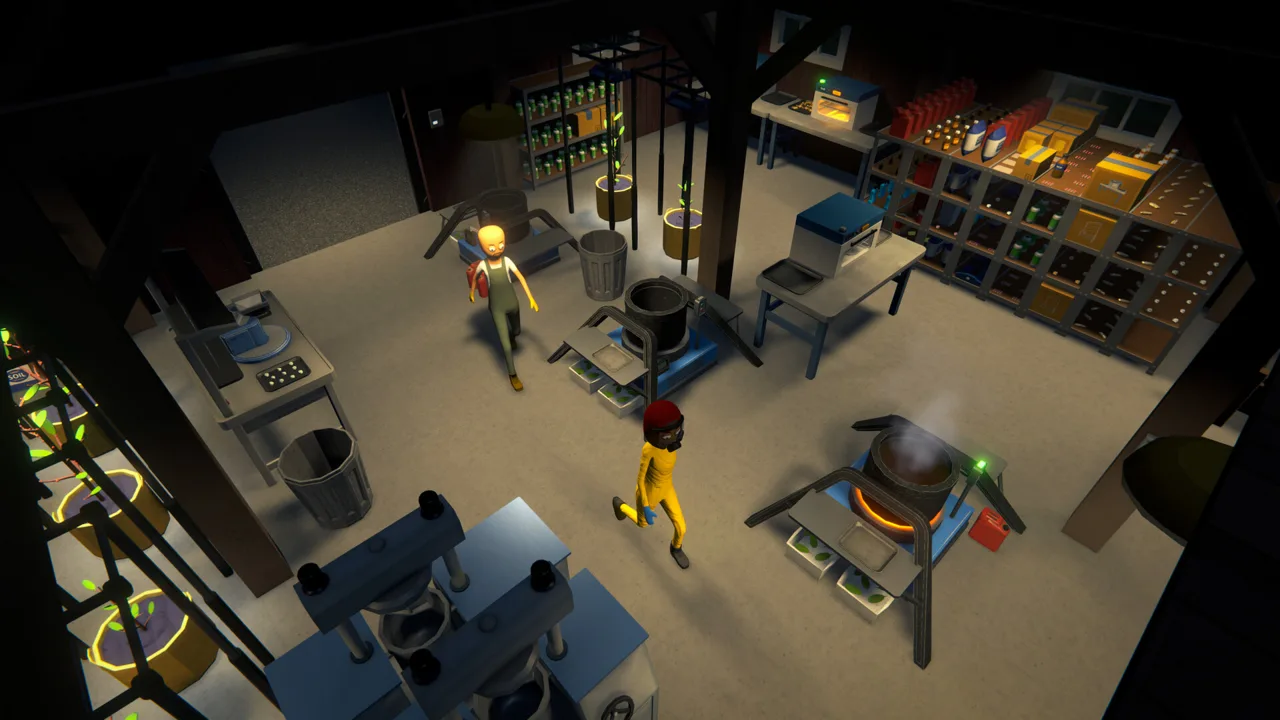 Image: Steam / TVGS
Before buying equipment, set aside enough money to replenish the production you already have. Add capacity when you can keep it supplied.
Collect trash between errands
Buy the $20 trash grabber from the hardware store and collect litter along your existing routes. Empty it into a Cash for Trash machine, run the machine, and collect the payout.
Filled trash bags from your property can go into these machines too. Use the income to cover small supply purchases while your operation is still getting established.
Once production and deliveries occupy your day, keep trash collection secondary. Interrupting a profitable sales route to sweep distant streets slows your expansion.
Keep both cash and bank funds available
Some purchases require cash, while hardware store purchases use your online balance. Check the payment requirement before making a shopping trip.
Use an ATM to deposit or withdraw money as needed. Keep cash available for supplier payments and other expenses instead of depositing your entire wallet automatically.
Albert Hoover initially provides seeds on credit. Reserve enough earnings to repay that tab before spending on expansion. Supplier debt appears in the Messages and Contacts apps.
Spend on the task slowing you down
Buy upgrades that address a visible problem:
- Add growing capacity when orders regularly exceed your harvests.
- Add storage when supplies and finished products compete for shelf space.
- Buy sprinklers when watering interrupts your other work.
- Buy a cheap skateboard when delivery travel consumes your day.
- Save cosmetic purchases for after your operation can fund itself.
Check sprinkler coverage before buying several. The Anniversary Update added the Big Sprinkler, and patch v0.4.5f2 made it available at Oscar’s store, giving larger setups another watering option.
Build Customers, Negotiate Prices, and Recruit Dealers
Use samples to expand beyond your starting buyers. Open your contacts and map, find potential customers connected to existing customers, and offer products that match their preferred effects.

Compare the displayed sample acceptance chances before committing valuable inventory. Reserve some stock for samples instead of selling every unit from a harvest.
Accept orders you can actually deliver
Check your available inventory before agreeing to a request. Include stock already promised to other customers.
Decline orders you cannot fulfill. Accepting requests against a harvest that still needs growing, processing, or packaging creates unnecessary deadlines.
Inspect the product name and quality during the trade. The deal screen displays the customer’s expected quality.
Raise prices through manageable counteroffers
Use message-based counteroffers to negotiate individual orders.
Avoid applying one fixed markup to every product and buyer. Compare each product’s costs and the customer’s preferred effects before negotiating.
Quality also needs careful handling. Since v0.4.5, theoretical customer evaluations used to generate offers and assess counteroffers exclude quality consideration. Check the actual delivery requirements before assuming that an accepted price makes any quality acceptable.
Give dealers customers and inventory
Benji Coleman becomes available through recommendations from his connections. Build relationships with Peggy, Beth, or Ludwig to work toward that introduction.
After recruiting him:
- Give him packaged products.
- Assign customers through the dealer management app.
- Replenish inventory as he sells it.
Dealers can serve up to 10 assigned customers following the v0.4.3 increase from eight. Use the management app’s customer regions and standards to organize assignments, and keep some personal deliveries if you enjoy negotiating individual orders.
Dealers reserve inventory for accepted deals, so consider their upcoming commitments before removing stock.
Improve Production Before Adding Complicated Mixes
Keep your initial product line simple enough to replenish consistently. Every additional mixing step introduces another ingredient to purchase, store, transport, and process.

Experiment once ordinary harvests can support both your existing customers and recipe testing. Compare the extra sale value against ingredient expenses and the time required to produce a batch.
Balance yield, quality, and growing time
PGR increases yield. Fertilizer improves quality.
Choose additives around your customers’ standards and your production needs. More units help only when you can move them, and better quality adds processing value only when the resulting product suits your market.
Apply additives before a plant finishes growing. Since v0.4.2, fully grown plants no longer accept them.
Use drying racks deliberately
Drying racks improve product quality but add another stage between harvest and sale. Set their quality threshold around the product quality you intend to sell.
Watch where stock accumulates. If drying racks remain full, inspect the next stage. If mixers stay empty, examine the supply arriving from drying.
Warm temperatures can boost plant growth and drying rack speed. Check the temperature heatmap when arranging AC units, especially if you later introduce mushroom cultivation, which requires cooling.
Keep early mixing chains short
Start with a recipe that fits your available space and staffing. Limit a compact bungalow recipe to two mixing ingredients to conserve space.
Keep separate supplies for each ingredient, and leave room to operate both mixing stations.
Adjust batch thresholds around your actual supply. The Mk II mixing station’s threshold was corrected from 10 to 20 in v0.4.3, so use the controls on your current station rather than copying an older setup’s numbers.
Lay Out the Bungalow Around the Production Flow
Arrange the bungalow so employees can move from supplies to growing, processing, packaging, and finished storage without blocked doorways or crowded workstations.
A compact cannabis operation can use this equipment layout:
| Equipment | Quantity | Assignment |
|---|---|---|
| Moisture-preserving pots | 12 | Growing |
| Grow lights | 12 | Lighting the pots |
| Suspension racks | 12 | Supporting the lights |
| Mk II mixing stations | 2 | Running a two-stage recipe |
| Mk II packaging station | 1 | Packaging the finished mix |
Place growing equipment together, arrange mixers in processing order, and keep packaging supplies near the packaging station. Leave room for employees to stand at each machine and pass through the doors.
Dedicate storage to specific jobs:
- Seeds and soil for botanists.
- Harvested or dried product awaiting mixing.
- Separate supplies for each mixing ingredient.
- Packaging materials.
- Finished orders ready for collection.
Rename objects with the management clipboard. Names such as “Seeds and Soil,” “Mixer Input,” and “Finished Orders” make destinations easier to distinguish than identical shelf icons.
Metal storage closets unlock at Bagman I and hold more item slots than storage racks. Compare their capacity and footprint when upgrading a crowded room.
Keep the purchase budget separate from operating money. Equipment, hiring fees, wages, and ingredients all draw from your funds before a newly configured production line delivers its first sale.
Assign Employees and Connect Every Transfer
An automated operation needs more than hired workers. Assign production employees to lockers, fund their wages, and give them clear work assignments.
Use lockers for employee assignments. Older bed-based layouts predate that requirement.
For the 12-pot bungalow layout, divide growing duties between two botanists. Add a chemist for the mixing stations, a handler for packaging and supply transfers, and a cleaner if you want trash collection automated.
Configure botanists first
Give each botanist an accessible supply source containing the correct seeds and soil. Assign the growing equipment they will manage.
Set the drying racks’ quality target, then watch the harvest move through drying before supplying the mixing stations.
Separate station outputs from handler routes
Assign processing work to the chemist and material transfers to the handler. Check both sets of assignments when a station has stopped receiving supplies.
For a two-stage mixing chain, configure these handler routes:
- Harvest storage to the first mixer.
- The first ingredient shelf to the first mixer.
- The second ingredient shelf to the second mixer.
- Finished mix storage to the packaging station.
- Packaging supplies to the packaging station.
Assign the chemist to both mixers and the handler to packaging. Keep one packaging format stocked in the active supply area while establishing the chain.
Diagnose idle workers in production order
Follow the product from its starting supplies to its final shelf:
- Nothing is planted: Check seeds, soil, supply assignments, and wages.
- Harvests remain at the growing stage: Check botanist assignments.
- A mixer stays empty: Check its product and ingredient routes.
- A mixer stays full: Check the chemist’s assignment.
- Packaging stops: Check packaging supplies, input routes, and output space.
- Workers cannot reach equipment: Clear the approach and doorway.
Employees end their shifts at 4:00 a.m. Resume inspection during working hours before rearranging a functioning setup.
Avoid using employee inventories as spare product storage. Since v0.4.5, employees other than dealers consume bagged products left in their inventories.
After checking assignments, supplies, wages, and access, save and reload if a worker remains stuck. Watch the line through complete production cycles before leaving it to run.
Expand Through Cartel Territory and New Products
As you progress into Westville, Thomas Benzies introduces the cartel’s offer. Accepting it involves supplying the cartel and limiting where you operate. Refuse the arrangement when you want to pursue expansion beyond its territorial restrictions.
Prepare for interference with your dealers and attacks on your operation. Keep enough supplies and money available to recover from losses.
Reduce cartel influence by unlocking customers, using graffiti, and confronting cartel activity. Since v0.4.3, interrupting Benzies members spraying graffiti also reduces their influence and awards XP.
Continue building your presence in regions where the cartel remains strong.
Add product lines when you can support their equipment
Follow the introduction quests as new product types become available. The Shrooms Update places mushrooms after meth and before cocaine in progression.
Mushroom production introduces mushroom beds, a spawn station, new supplies, and cooling requirements. Botanists can handle its production tasks, but the existing cannabis layout needs appropriate equipment and temperature control before it can support that line.
Inspect the property’s employee allowance before moving a larger operation. The Weather Update increased the docks warehouse’s worker limit from 10 to 12.
Prepare for “Finishing the Job”
The late cartel quest requires expanding your influence across Hyland Point and following Uncle Nelson’s payphone instructions.
For the mission itself, prepare $10,000 for Sam’s tunnel work and 20 grams of cocaine for Billy’s RDX trade. Stan then requires you to deal with a thief before converting the RDX into the mission’s bomb item.
Bring a weapon for the thief encounter at the docks. Once the tunnel is ready, follow the quest to plant the item beneath Hyland Manor and finish the cartel storyline.
Plan Late-Night Sales, Laundering, and Bulk Orders
Curfew runs from 9:00 p.m. to 5:00 a.m., and completing deals during curfew earns a bonus. Schedule nighttime deliveries when you can handle the route and police attention.
The Weather Update also added a rainy bonus for deals completed during rain. Check the deal payout rather than assuming every delivery receives the same extras.
At 4:00 a.m., the day waits for sleep to advance. Use that time for remaining errands and management, while remembering that employee shifts have ended.
Expand laundering alongside production
Growing cash income can outpace your ability to fund purchases from your bank balance. Add laundering capacity when that becomes the constraint on expansion.
Use the delivery app’s reorder feature to simplify repeat supply purchases. Keep enough ingredients on hand to cover production while replacement orders travel.
Keep stock available for special customers
The October 9, 2026 v0.4.7 update added four traveling customer groups: Hippies, Party Bus, Businessmen, and Bikers. They periodically visit Hyland Point and buy large quantities of their preferred drug types.
Check what visiting groups want before committing inventory. Reserve enough product for accepted regular orders, then use suitable surplus for bulk sales.
If finished inventory repeatedly fills your shelves, expand distribution before adding more production equipment. If visiting groups and regular buyers empty storage faster than workers replenish it, trace the production chain and upgrade the stage that cannot keep up.
Continue with
 Schedule I Ranks: All Tiers, XP Requirements, and UnlocksExplore Schedule I ranks from Street Rat to Kingpin, with XP requirements, region unlocks, key equipment milestones, and tips to keep your empire growing.
Continue exploring
Schedule I Reddit: Find Help, Builds, and Update News
Use Schedule I reddit searches to find automation help, co-op partners, and update discussions. See patch changes that matter before rebuilding your setup.

Schedule I Best Customers for Dealers: All 6 Setups
Find Schedule I best customers for dealers, with all six assignment lists, the 10-customer limit, and tips on which spenders to keep selling to yourself.
Join the community
Official channels for news, updates and player help: